
If you’re still running aws configure and pasting long‑lived access keys into your laptop, it’s time to upgrade your workflow. aws login gives you short‑lived, auto‑refreshing credentials through your browser, using the same sign‑in experience as the AWS Management Console, with no permanent keys stored on disk.
Why aws configure feels risky
The classic flow is familiar:
aws configure
You paste an access key and secret, and the AWS CLI writes them to ~/.aws/credentials. Those keys often live there for months or years, and can easily end up in screen recordings, demos, shell history, or Git repos. Rotating them is manual, and they usually don’t enforce things like MFA or centralized identity policies.
AWS strongly recommends using short‑lived credentials via roles, federation, and modern sign‑in instead of long‑lived IAM user keys for humans.
What aws login changes:
With aws login, you sign in the same way you sign in to the console, and the CLI handles credentials for you.
At a high level:
- The CLI opens your browser and sends you through the AWS sign‑in flow.
- Behind the scenes it uses OAuth 2.0 with PKCE, so your password stays in the browser and the authorization code cannot easily be stolen or replayed.
- The CLI exchanges the authorization code for short‑lived AWS STS credentials that can last up to your IAM session limit (often up to 12 hours).
- Those credentials are cached and automatically refreshed every few minutes until the session expires.
No more managing long‑lived keys in ~/.aws/credentials, and no more custom rotation scripts.
How to use aws login in 3 commands
On a new machine or a fresh dev environment, the flow is straightforward:
- Check your AWS CLI version:
aws --version
Make sure you’re using AWS CLI v2 with support for aws login (for example, 2.32.x or later).
2. Log in:
aws login
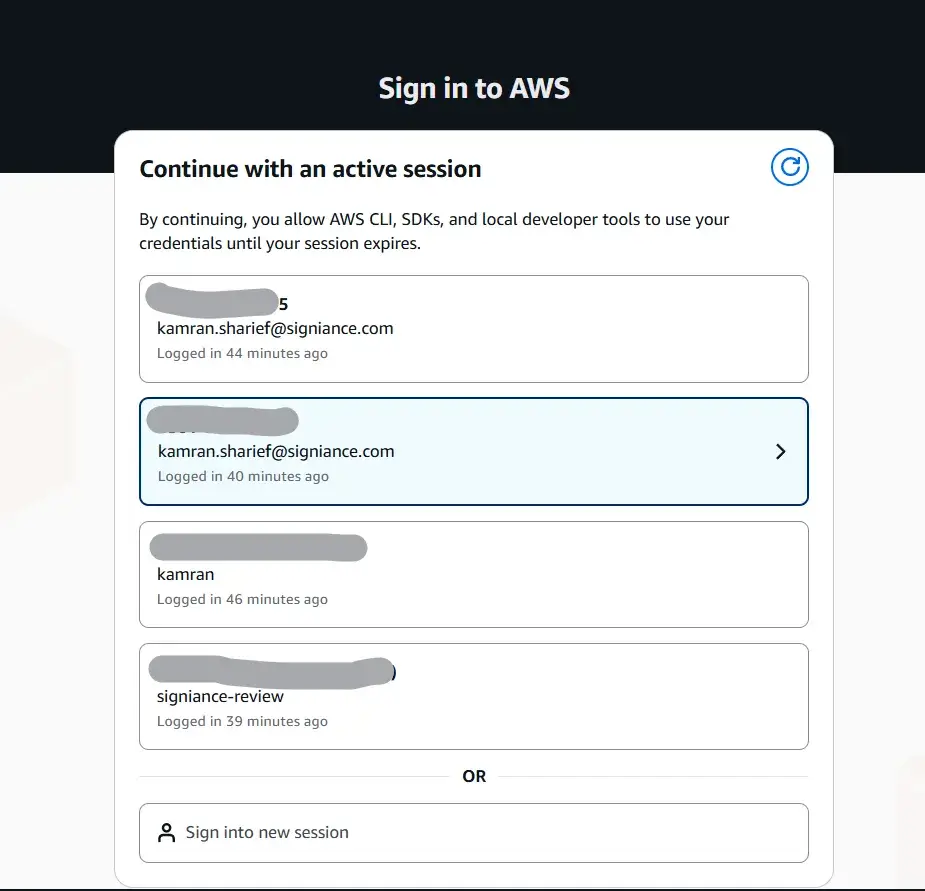
This opens your browser, where you either continue an existing console session or sign in as a root user, IAM user, or federated user, just like you normally do.

Confirm who you are:
aws sts get-caller-identity
This shows the account and identity that the CLI is using for your commands.
From there, you keep using the CLI as usual; it refreshes credentials automatically in the background.
Using profiles with aws login
If you have multiple environments (for example, dev and prod-admin), you still get to use profiles, just without long‑lived keys.
You can configure your profiles in ~/.aws/config:
[profile dev]
region = us-west-2

[profile prod-admin]
region = us-east-
Then log in to each profile as needed:
aws login --profile dev
aws login --profile prod-admin
And run commands with the right identity:
aws sts get-caller-identity --profile dev
aws sts get-caller-identity --profile prod-admin
The CLI creates a login session per profile, caches credentials under the hood, and keeps them fresh until the session expires.
What about existing SSO setups?
If you already use AWS IAM Identity Center (AWS SSO), you might be familiar with aws configure sso and aws sso login. That flow also gives you short‑lived credentials, and now uses PKCE‑based authorization as well.
The nice thing is that aws login brings a similar, console‑like UX even when you’re signing in as a root or IAM user instead of using Identity Center. You can choose from active console sessions and roles, and still rely on centralized IAM policies and role‑based access.
Why you might never go back
Once you switch to aws login, a few things become hard to give up:
- No long‑term access keys sitting on your laptop.
- Automatic credential refresh managed for you by the CLI.
- One consistent sign‑in story between console, CLI, and SDKs for local development.
For human developers on laptops and desktops, this is much closer to the “right way” to access AWS: modern auth, short‑lived credentials, and fewer chances to accidentally leak a key in your next demo.
# aws login is now available in AWS CLI v2.32.0+ and you can see the official launch blog here and the docs here