
Building Systems That Scale Without Surprises
Setting up AWS infrastructure is often treated as a one-time technical task. Teams create an account, launch services, deploy applications, and move on. In reality, early infrastructure decisions shape cost, security, scalability, and reliability for years.
Many production issues are not caused by AWS itself, but by poor foundational setup. Weak account structure, unclear networking boundaries, missing monitoring, and loose access controls quietly introduce risk. These problems usually surface later, when systems are under load or when teams try to scale.
This blog outlines AWS infrastructure setup best practices that focus on long-term stability. The goal is not speed at any cost, but building infrastructure that grows predictably, stays secure, and remains manageable as complexity increases.
Start With a Clear AWS Account Structure
Separate environments early
One of the most common early mistakes is running everything in a single AWS account. Development, testing, and production workloads end up sharing the same resources and permissions.
Best practice is to separate environments using multiple AWS accounts. At a minimum, production should be isolated from non-production workloads. This limits blast radius, improves security, and makes cost tracking more accurate.
Using AWS Organizations helps manage these accounts centrally while maintaining isolation.
Design Networking With Clear Boundaries
Treat VPC design as a foundation, not a detail
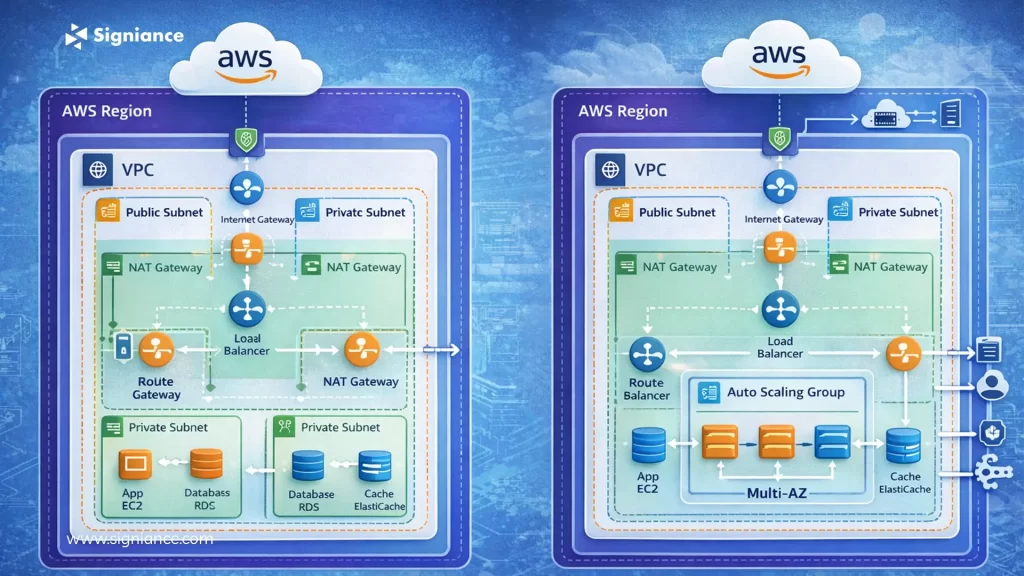
Networking is often rushed during initial setup. Default VPCs, flat subnet structures, and overly permissive routing rules create problems later.
A well-designed VPC should:
- Use private subnets for application and database workloads
- Expose only necessary services through public subnets
- Control traffic using security groups and network ACLs
- Avoid unnecessary internet access for internal components
Clear network boundaries reduce attack surface and make systems easier to reason about.
Apply the Principle of Least Privilege From Day One
IAM mistakes compound over time
Identity and Access Management is one of the most sensitive areas of AWS setup. Early shortcuts, such as using broad permissions or shared credentials, often become permanent.
Best practices include:
- Granting minimum required permissions to users and services
- Using roles instead of long-lived access keys
- Separating human access from application access
- Auditing permissions regularly
Strong IAM hygiene improves security and simplifies compliance as teams grow.
Make Infrastructure Repeatable With Infrastructure as Code
Manual setup does not scale
Clicking through the AWS console works for experiments, not for production systems. Manual configuration introduces inconsistency and makes recovery difficult.
Infrastructure as Code tools such as AWS CloudFormation or Terraform allow teams to define infrastructure declaratively. This enables version control, repeatable deployments, and safer changes.
Infrastructure should be treated like application code. Changes should be reviewed, tested, and documented.
Build for Observability, Not Just Availability
You cannot fix what you cannot see
Many teams focus on making systems available but overlook observability. Logs, metrics, and alerts are added only after incidents occur.
Best practice is to design observability upfront:
- Enable structured logging for applications
- Collect metrics for infrastructure and workloads
- Set meaningful alerts based on behavior, not noise
- Centralize logs for easier analysis
Observability reduces downtime by helping teams detect and resolve issues before users notice.
Design Cost Awareness Into the Architecture
Cost optimization starts at setup, not later
AWS makes it easy to provision resources, but without cost controls, spending can grow unnoticed.
Best practices include:
- Using cost allocation tags from the beginning
- Setting budgets and alerts for accounts and services
- Choosing managed services where operational overhead is high
- Right-sizing resources instead of defaulting to larger instances
Cost awareness should be part of architectural decisions, not an afterthought.
Plan for Scaling Without Overengineering
Scale intentionally, not prematurely
Some teams overengineer infrastructure for scale they may never reach. Others ignore scaling entirely and face outages later.
The balance lies in designing systems that can scale incrementally. Use managed services that handle scaling automatically where possible. Avoid tightly coupled components that limit flexibility.
Scaling should be a controlled evolution, not a sudden redesign.
Secure Data by Default
Data protection is non-negotiable
Data security is often assumed rather than enforced. Encryption, backups, and access controls are sometimes added late.
Best practices include:
- Encrypting data at rest and in transit
- Restricting access to sensitive data stores
- Automating backups and testing recovery procedures
- Logging access to critical resources
Data security failures are costly and hard to recover from. Prevention is far easier than remediation.
Separate Deployment From Runtime Concerns
Deployment speed should not compromise stability
CI/CD pipelines should be designed to deploy changes safely. Automated testing, staged rollouts, and rollback mechanisms reduce risk.
Runtime systems should remain stable even when deployments fail. Decoupling deployment logic from runtime behavior improves resilience.
This separation becomes critical as teams grow and release frequency increases.
Document Decisions and Ownership
Clarity prevents future confusion
Infrastructure decisions should be documented. Not in lengthy manuals, but in clear notes explaining why choices were made.
Ownership should also be clear. Every system needs someone responsible for its health, cost, and evolution.
Documentation and ownership reduce dependency on individuals and make onboarding easier.
Conclusion
AWS provides powerful building blocks, but the quality of an infrastructure depends on how those blocks are assembled. Most infrastructure problems are not caused by scale, but by weak foundations.
Following AWS infrastructure setup best practices helps teams build systems that are secure, scalable, and predictable. The effort invested early pays off by reducing outages, controlling costs, and enabling confident growth.
Infrastructure should support the business quietly, not demand constant attention.
If you are setting up or reviewing your AWS infrastructure, start with the foundations. Clear account structure, secure access, repeatable deployments, and observability make long-term growth far easier.
Thoughtful setup today prevents expensive rework tomorrow.