
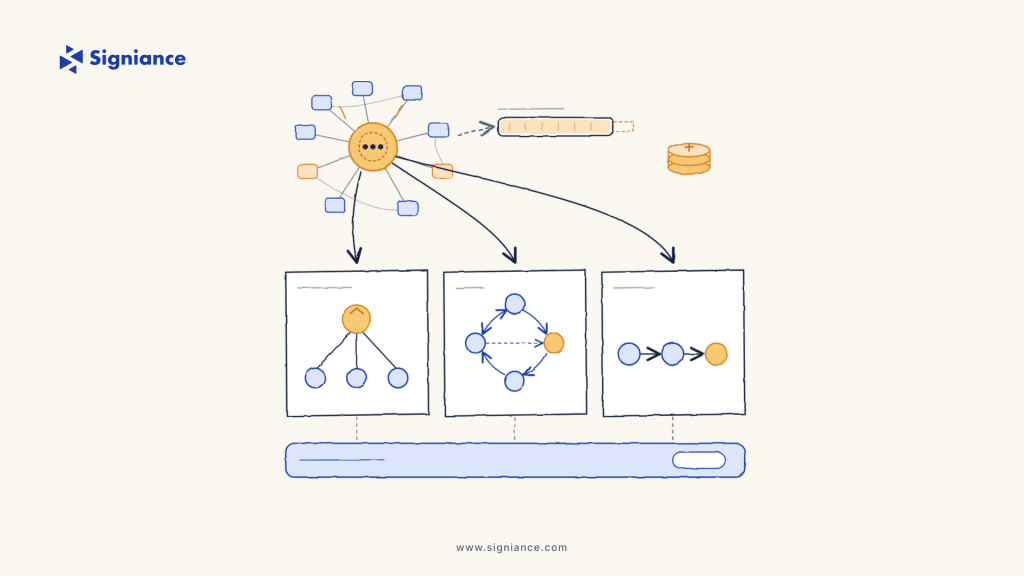
How to choose between supervisor, swarm and pipeline designs on AWS, and when a single agent is still the better answer.
In this article
- Signs Your Single Agent Has Hit Its Limit
- Pattern 1: Supervisor (Agents as Tools)
- Pattern 2: Swarm (Agents Hand Off to Each Other)
- Pattern 3: Pipeline (Graph or Workflow)
- Running Multi-Agent Systems on Amazon Bedrock AgentCore
- A Quick Decision Checklist
- How Signiance Helps
Most startups do not need a multi-agent system. Some do, and they usually find out the hard way: one agent with 40 tools, a 6,000 word system prompt and a context window that fills up halfway through the task. Quality drops, latency climbs and nobody can tell which instruction the model ignored.
Choosing between multi-agent architecture patterns is less about fashion and more about one question: who decides what happens next? This guide walks through the three patterns that cover most real workloads (supervisor, swarm and pipeline), how to build each on AWS with Strands Agents and Amazon Bedrock AgentCore, and the cost trade-off that should make you hesitate before splitting anything.
Signs Your Single Agent Has Hit Its Limit
Before reaching for more agents, check whether you have a single-agent problem or a multi-agent one. These are the signals we see most often in startup codebases:
- Tool overload. The agent picks the wrong tool because twenty of them have overlapping descriptions.
- Context exhaustion. Research or document-heavy tasks gather more material than fits in one context window, so early findings get truncated.
- Conflicting instructions. The billing rules and the support tone guide fight each other inside one prompt.
- Work that could run in parallel runs in series. Five independent lookups happen one after another because one agent owns the loop.
If your problem is a vague prompt or missing evaluations, more agents will multiply it. Fix the prompt, add an [evaluation set](/ai-agent-evaluation-before-launch-batch-evals-agentcore) and measure first.
There is also a cost reason to be careful. In Anthropic’s write-up of its multi-agent research system, agents used about 4 times more tokens than chat interactions, and multi-agent systems used about 15 times more. The same system, with a Claude Opus 4 lead agent and Claude Sonnet 4 subagents, outperformed single-agent Claude Opus 4 by 90.2 percent on Anthropic’s internal research evaluation. Token usage alone explained 80 percent of the performance variance on the BrowseComp benchmark. Multi-agent systems win largely by spending more tokens in parallel, so the task has to be worth it.
Anthropic also notes where the pattern fits poorly: tasks where every agent needs the same context, tasks with many dependencies between agents, and most coding tasks.
Pattern 1: Supervisor (Agents as Tools)
Who decides: a supervisor model.
A supervisor agent receives the request, breaks it into subtasks and calls specialist agents as if they were tools. Each specialist has a narrow prompt and a small toolset. The supervisor merges the results.
This is the right default for most startups because it keeps one place in control and one trace to debug. In Strands Agents, which reached 1.0 in July 2025 with production multi-agent primitives, a specialist can be wrapped as a tool:
from strands import Agent, tool

billing_agent = Agent(system_prompt="You answer billing questions using the invoice tools only.",
                      tools=[get_invoice, list_payments])

@tool
def billing_specialist(question: str) -> str:
    """Answer questions about invoices, refunds and payment status."""
    return str(billing_agent(question))

supervisor = Agent(
    system_prompt="Route each part of the request to the right specialist, then write one reply.",
    tools=[billing_specialist, account_specialist, product_specialist],
)
Trade-offs. AWS’s own pattern comparison lists the weak points: the orchestrator becomes a single point of failure, its prompt grows complex, and specialists only see what the supervisor passes them. Pass structured inputs, not the full conversation, and log every specialist call.
Good fits: support triage, sales research assistants, internal ops copilots where requests split into clearly separate parts.
Pattern 2: Swarm (Agents Hand Off to Each Other)
Who decides: the agents themselves, through handoffs.
In a swarm there is no fixed boss. Each agent can pass control to a peer that is better suited to the next step, sharing working context along the way. Strands exposes this as Swarm:
from strands.multiagent import Swarm

swarm = Swarm(
    [researcher, analyst, writer],
    max_handoffs=10,
    max_iterations=15,
    execution_timeout=300.0,
    node_timeout=60.0,
)
result = swarm("Draft a competitor brief on usage-based pricing for dev tools")
The limits are the important part. Without max_handoffs and timeouts, two agents can bounce a task between them and burn tokens until something breaks. AWS’s comparison names timeout sensitivity and iteration overhead as the main swarm risks.
Good fits: open-ended research, brainstorming and iterative drafting, where the right order of steps changes from task to task. Poor fits: anything regulated or customer-facing where you need to explain exactly why the system took a path.
Pattern 3: Pipeline (Graph or Workflow)
Who decides: you, in code.
A pipeline fixes the order of steps as a graph. Each node is an agent, edges define who runs next and conditions handle branching. Strands provides GraphBuilder:
from strands.multiagent import GraphBuilder

builder = GraphBuilder()
builder.add_node(intake_agent, "intake")
builder.add_node(extract_agent, "extract")
builder.add_node(review_agent, "review")
builder.add_edge("intake", "extract")
builder.add_edge("extract", "review", condition=needs_review)  # your own check
builder.set_entry_point("intake")
graph = builder.build()
Pipelines are the easiest pattern to audit, retry and cost-control, because every run follows a known path. The cost is flexibility: a graph is only as smart as the flow you designed, and deep graphs add latency at every hop. When steps are independent, a workflow with parallel branches recovers some of that speed.
Good fits: document processing, onboarding flows, KYC checks, report generation, and anything a compliance team will ask you to explain.
A simple rule of thumb from the Strands community: use a graph when the order is always the same, a workflow when steps can run in parallel, and a swarm when the order genuinely varies by task.
Running Multi-Agent Systems on Amazon Bedrock AgentCore
Inside one process, the patterns above are just Python. Across teams, services or frameworks, you need agents that talk over the network. Amazon Bedrock AgentCore Runtime supports the Agent-to-Agent (A2A) protocol for this:
- Your A2A server listens on port 9000 by default and receives JSON-RPC 2.0 requests with a POST to the root path.
- It publishes an agent card at
/.well-known/agent-card.json, so other agents can discover its skills. - Callers authenticate with OAuth 2.0 bearer tokens or AWS SigV4, and the platform adds a session header for isolation.
- The container must be ARM64 and stateless, so keep conversation state in AgentCore Memory or your own store.
Rule of thumb: keep agents in one process until you have a real reason to split them, such as different teams owning them, different release cycles, or a partner agent you do not control. Network hops add latency, failure modes and auth work.
One more AWS detail worth knowing: the Bedrock multi-agent collaboration documentation now labels Bedrock Agents as Amazon Bedrock Agents Classic and points new builds to AgentCore and Strands. If you are starting fresh, start there.
Whatever pattern you choose, production basics do not change:
- Trace every hop. Each agent call, handoff and tool call should appear in one trace. Our guide to [LLM observability](/llm-observability-aws-traces-not-just-logs) covers the setup.
- Budget tokens per run. Cap handoffs, iterations and timeouts, and alert on runs that exceed them.
- Right-size each agent. Specialists with narrow jobs often run well on smaller models, which offsets the token multiplier. See our post on [cutting inference cost](/reduce-llm-inference-cost-caching-routing-right-sized-models).
- Roll out behind a split. Ship the multi-agent version to a slice of traffic and compare against the single agent, as in our [A/B testing guide](/ab-testing-ai-agents-production-agentcore).
A Quick Decision Checklist
Answer these before you split an agent:
- Does the task gather more information than one context window can hold?
- Can parts of it run in parallel without sharing state?
- Is each result valuable enough to justify several times the tokens?
- Can you name the owner of every agent and every handoff?
Two or more yes answers suggest a multi-agent design is worth a prototype. Start with a supervisor, move to a pipeline when the path stabilises, and keep swarms for work where flexibility matters more than predictability.
How Signiance Helps
We helps startups move agents from prototype to production. Our AI Native Engineering team designs agent architectures on Amazon Bedrock, AgentCore and Strands Agents, picks the simplest pattern that solves the problem, and sets up the tracing, evaluation and cost controls that keep it reliable. We also help you use AWS Activate credits and funding programs to fund the build.
If your single agent is straining or you are weighing a multi-agent redesign, book a free consultation or a free AI Native readiness assessment at signiance.com.